98 lines
4.5 KiB
Markdown
98 lines
4.5 KiB
Markdown

|
#### 2017-09-23:
|
||
|
|
Changed the default value of `g:SignatureForceRemoveGlobal` to 0 since using `:wviminfo!`/`:wshada!` is a very heavy hammer and because it goes against a \*vim default.
|
||
|
|
|
||
|
|
#### 2016-07-08:
|
||
|
|
Signature used to have a mapping conflict with NERDTree as both try to map the `m` key.
|
||
|
|
To get around this, I used to delete maps whenever I detected someone entering the NERDTree pane and recreate the maps upon exit.
|
||
|
|
However, this had a lot of issues and as of [cfa6452](https://github.com/kshenoy/vim-signature/commit/cfa64525305dbb8cec7eefc16e4ea460f007cd33) I've decided to remove any code that was intended to work around this since it wasn't working anyways. Refer to the discussion [here](https://github.com/kshenoy/vim-signature/issues/3#issuecomment-222565292) for more details.
|
||
|
|
Sorry for any inconvenience. If anyone has any ideas or suggestions please let me know.
|
||
|
|
|
||
|
|
# vim-signature
|
||
|
|
vim-signature is a plugin to place, toggle and display marks.
|
||
|
|
|
||
|
|
Apart from the above, you can also
|
||
|
|
* Navigate forward/backward by position/alphabetical order
|
||
|
|
* Displaying multiple marks (upto 2, limited by the signs feature)
|
||
|
|
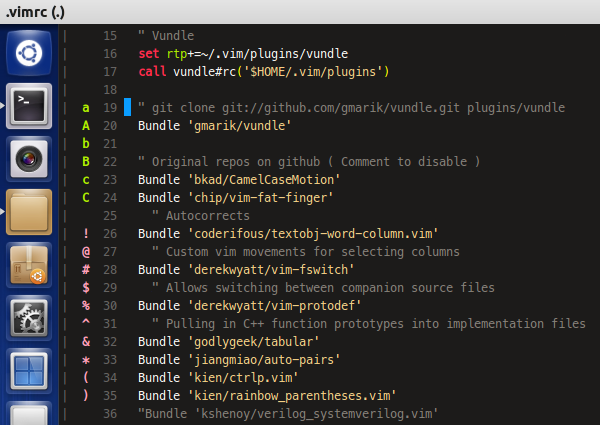
* Placing custom signs !@#$%^&*() as visual markers
|
||
|
|
|
||
|
|
|
||
|
|
### Screenshots
|
||
|
|
|
||
|
|
Displays the marks as signs. Also place visual markers
|
||
|
|
|
||
|
|
|
||
|
|
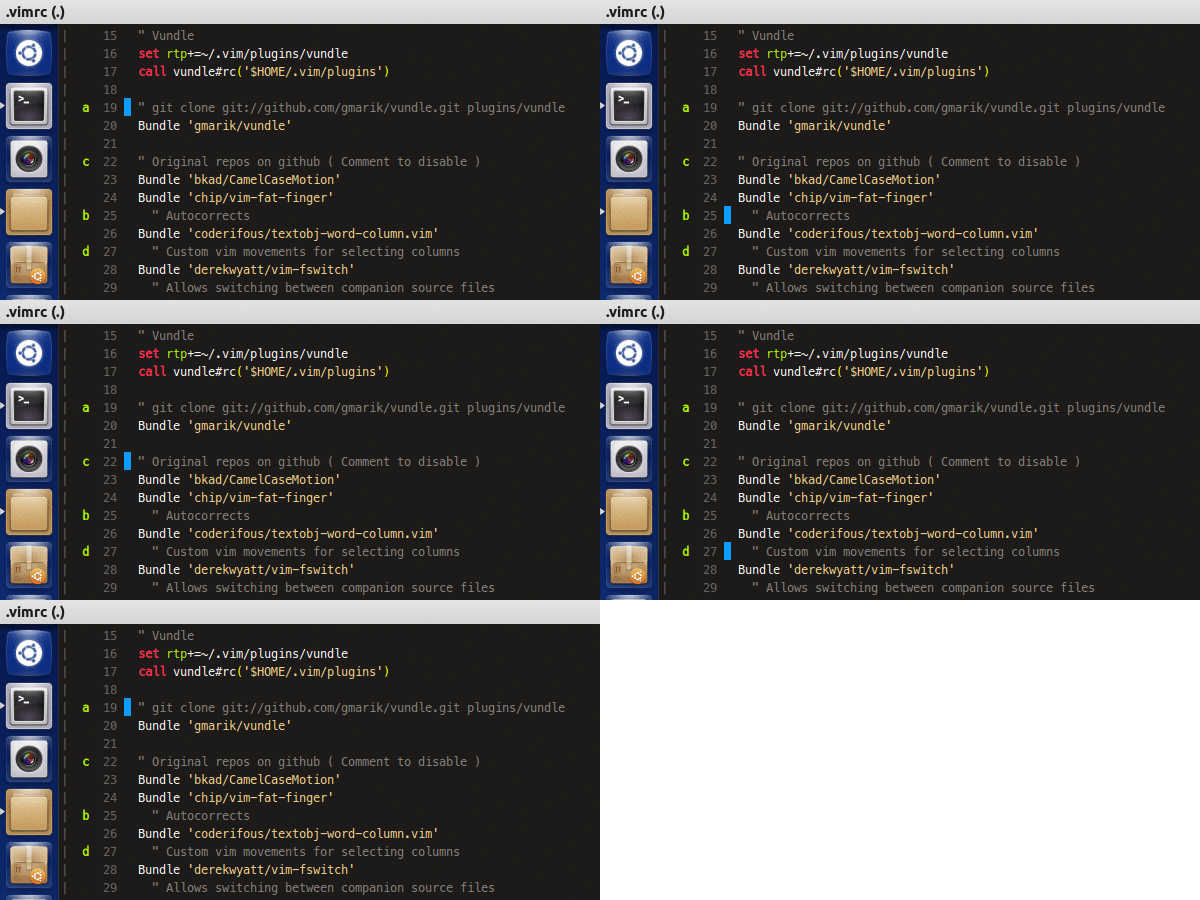
Alphabetical mark traversal and more.
|
||
|
|
|
||
|
|

|
||
|
|
|
||
|
|
Also supports dynamic highlighting of signs. In the image above the marks are colored according to the state of the line as indicated by gitgutter.
|
||
|
|
|
||
|
|
NOTE: This feature is disabled by default
|
||
|
|
|
||
|
|
More screenshots [here](http://imgur.com/a/3KQyt)
|
||
|
|
|
||
|
|
### Vim.org mirror
|
||
|
|
If you like the plugin, spread the love and rate at http://www.vim.org/scripts/script.php?script_id=4118
|
||
|
|
|
||
|
|
|
||
|
|
## Requirements
|
||
|
|
Requires Vim to be compiled with +signs to display marks.
|
||
|
|
|
||
|
|
|
||
|
|
## Installation
|
||
|
|
I recommend using a plugin manager to do the grunt work for you.
|
||
|
|
If for some reason, you do not want to use any of them, then unzip the contents of the .zip file to your ~/.vim directory.
|
||
|
|
|
||
|
|
Once that's done, out of the box, the followings mappings are defined
|
||
|
|
|
||
|
|
````
|
||
|
|
mx Toggle mark 'x' and display it in the leftmost column
|
||
|
|
dmx Remove mark 'x' where x is a-zA-Z
|
||
|
|
|
||
|
|
m, Place the next available mark
|
||
|
|
m. If no mark on line, place the next available mark. Otherwise, remove (first) existing mark.
|
||
|
|
m- Delete all marks from the current line
|
||
|
|
m<Space> Delete all marks from the current buffer
|
||
|
|
]` Jump to next mark
|
||
|
|
[` Jump to prev mark
|
||
|
|
]' Jump to start of next line containing a mark
|
||
|
|
[' Jump to start of prev line containing a mark
|
||
|
|
`] Jump by alphabetical order to next mark
|
||
|
|
`[ Jump by alphabetical order to prev mark
|
||
|
|
'] Jump by alphabetical order to start of next line having a mark
|
||
|
|
'[ Jump by alphabetical order to start of prev line having a mark
|
||
|
|
m/ Open location list and display marks from current buffer
|
||
|
|
|
||
|
|
m[0-9] Toggle the corresponding marker !@#$%^&*()
|
||
|
|
m<S-[0-9]> Remove all markers of the same type
|
||
|
|
]- Jump to next line having a marker of the same type
|
||
|
|
[- Jump to prev line having a marker of the same type
|
||
|
|
]= Jump to next line having a marker of any type
|
||
|
|
[= Jump to prev line having a marker of any type
|
||
|
|
m? Open location list and display markers from current buffer
|
||
|
|
m<BS> Remove all markers
|
||
|
|
````
|
||
|
|
|
||
|
|
This will allow the use of default behavior of m to set marks and, if the line
|
||
|
|
already contains the mark, it'll be unset.
|
||
|
|
The default behavior of `]'`, `['`, ``]` `` and ``[` `` is supported and enhanced by
|
||
|
|
wrapping around when beginning or end of file is reached.
|
||
|
|
|
||
|
|
The command `:SignatureToggle` can be used to show/hide the signs.
|
||
|
|
Note that this does not delete any of the marks but only hides them.
|
||
|
|
This is a buffer-specific command.
|
||
|
|
|
||
|
|
If for some reason, the marks and their sign displays go out of sync,
|
||
|
|
use `:SignatureRefresh` to refresh them.
|
||
|
|
|
||
|
|
For more details on customization refer the help
|
||
|
|
|
||
|
|
|
||
|
|
## Thanks to...
|
||
|
|
* Sergey Khorev for [mark-tools](http://www.vim.org/scripts/script.php?script_id=2929)
|
||
|
|
* Zak Johnson for [vim-showmarks](https://github.com/zakj/vim-showmarks)
|
||
|
|
|
||
|
|
|
||
|
|
## ToDo:
|
||
|
|
* Tie the Signature functions to vim commands that affect mark placement
|